
Welcome to the Next Generation of Agent Development.
Salesforce continues to push the boundaries of AI innovation with AgentScript, a scripting language designed specifically for building intelligent and predictable AI agents in Agentforce.
While Agentforce Builder allows us to create agents using prompts and configurations, AgentScript gives developers greater control over how an agent thinks, decides, and executes actions.
Think of it as moving from simply configuring an agent , to actually programming its behavior.
Why AgentScript?
One of the biggest challenges with AI agents is balancing:
- Natural language reasoning
- Business process control
In real-world business scenarios, we often need agents to:
- Follow a specific sequence of steps
- Collect mandatory information
- Invoke flows or Apex actions
- Route users to the correct process
- Maintain consistency across conversations
AgentScript introduces deterministic control while still leveraging AI reasoning capabilities. Instead of relying completely on prompts, we can explicitly define how an agent should behave.Salesforce describes AgentScript as the control plane for agentic decisions. It combines natural language instructions with structured logic to create predictable, context-aware AI agents.
Agent Script Blocks
A script consists of blocks where each block contains a set of properties.
These properties can describe data or procedures. Agent Script contains several different block types.
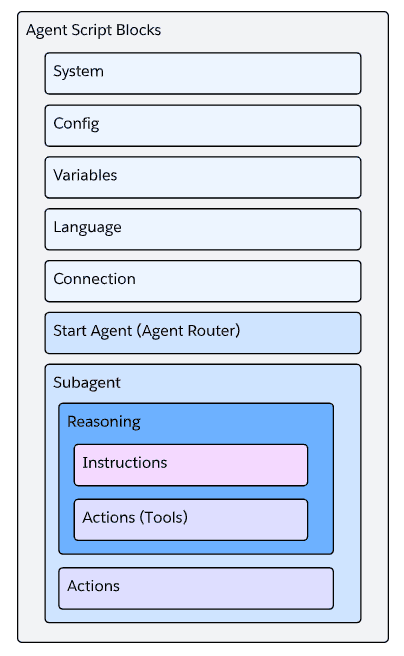
Core Building Blocks of AgentScript
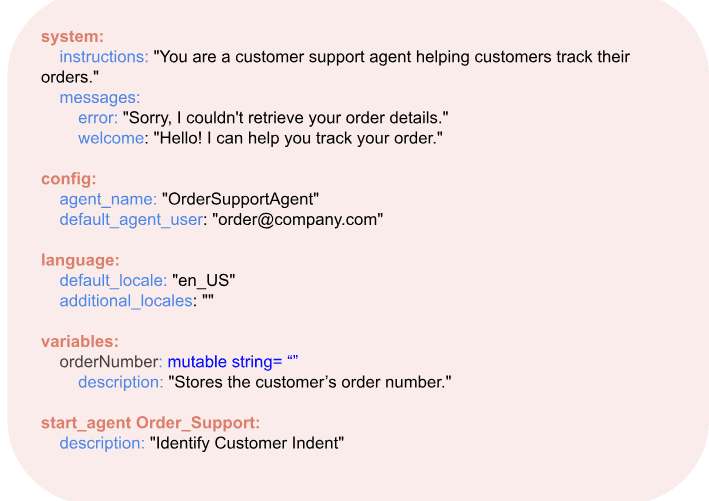
System Block
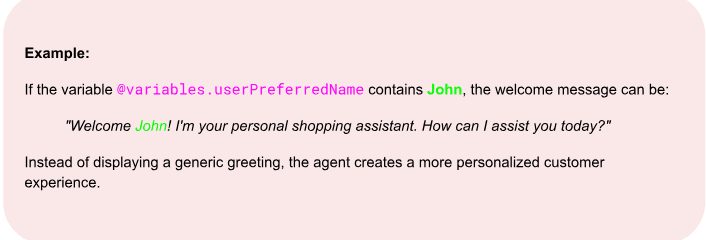
The System Block defines the agent's overall behavior and tone. It contains the instructions that guide the agent, along with the welcome and error messages shown during customer interactions.
It also supports personalization through variables, allowing the agent to greet customers with dynamic information such as their name, making conversations feel more natural and engaging.
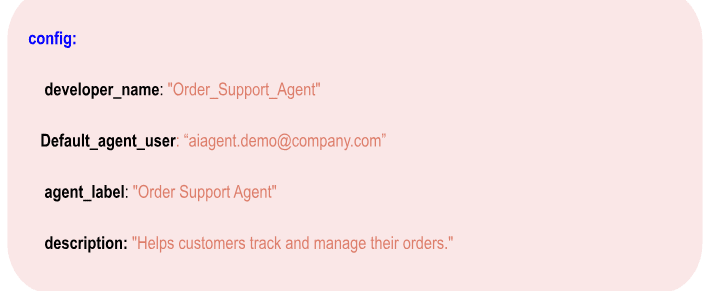
Config Block
The Config Block contains the basic configuration details of the agent, such as its name, description, and the Salesforce user under which it runs.
These settings help identify the agent and define its purpose.
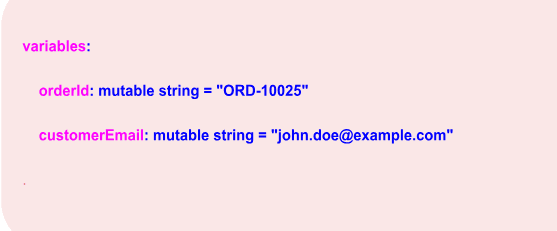
Variables Block
The variables block contains the list of global variables that the agent and script can use.
This helps the agent remember important details and maintain context.
start_agent Block
The start_agent block acts as the entry point for the agent and is responsible for:
Subagent classification
Routing conversations
Initializing variables
Determining the next step
With every customer utterance, the agent starts execution from this block before deciding which topic should handle the request.
"The start_agent block serves as the routing engine for all customer conversations."
Sub-Agent (Previously known as Topics)
The Sub-Agent Block represents a specialized area of responsibility within an agent. It contains the instructions, reasoning, and actions required to handle a specific business process.
Think of a sub-agent as a subject matter expert that focuses on a particular task, such as Order Management, Customer Verification, or FAQ Handlings
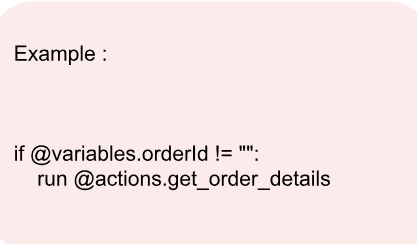
Example:
1. Order Management
2. Case Creation
3. Appointment Booking
4. Refund Processing
Each sub-agent contains its own instructions and actions.
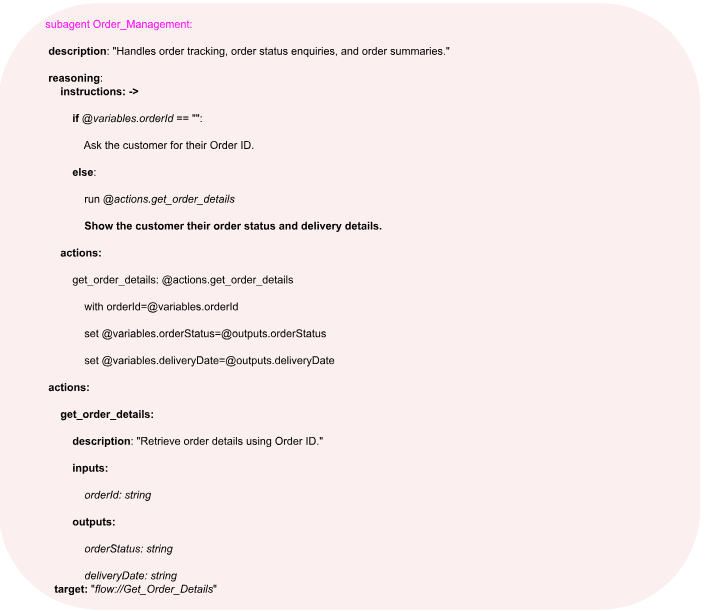
Agent Script Reference: Reasoning Instructions
The Reasoning Block contains the instructions that guide the agent's decision-making process.
Based on these instructions, Agentforce generates prompts for the LLM, helping it understand the business context and determine the most appropriate action to perform.
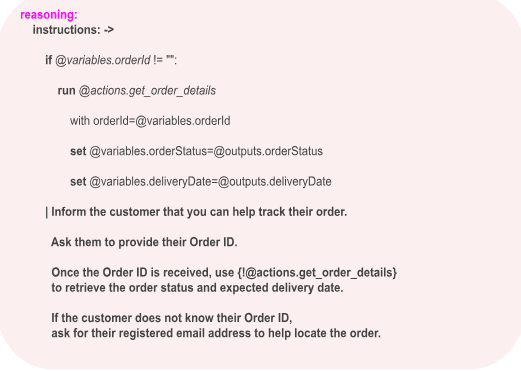
Understanding Reasoning Instructions
The Reasoning Block guides how the agent thinks and decides what action to perform. It consists of two types of instructions:
1. Logic Instructions
These are deterministic instructions that follow predefined conditions and rules.
They are used to:
1. Evaluate conditions using if statements.
2. Execute actions.
3. Set or update variables.
4. Control the flow of the conversation.
2. Prompt Instructions
These are natural language instructions that are passed to the LLM when the specified conditions are met.
They help the agent:
1. Communicate with users.
2. Ask questions.
3. Provide responses.
4. Guide the conversation naturally.
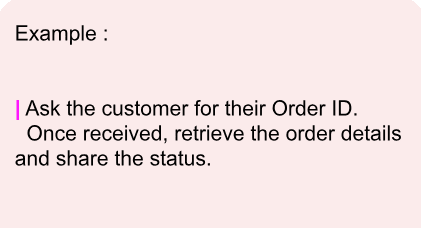
Note : Using the Pipe (|) Operator
The pipe (|) symbol is used to write multiline prompt instructions, making them easier to read and maintain.
It can be used:
1. Before logic instructions.
2. After logic instructions.
3. Alongside conditional logic within the same reasoning block.
What are Actions?
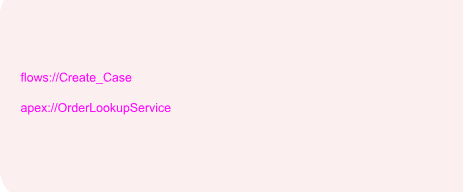
Actions are how agents perform work.
An action can:
1. Invoke a Flow
2. Execute Apex
3. Call an API
4. Retrieve Salesforce data
Conclusion
Agentforce Builder made it easy to create AI agents using prompts and configurations. With AgentScript, Salesforce introduces a more structured approach that gives developers greater control over how agents think, reason, and perform actions.
By combining Subagents, Reasoning Instructions, Variables, and Actions, we can build agents that are not only conversational but also capable of following business processes in a predictable and scalable manner.
As organizations continue to adopt AI-driven experiences, AgentScript provides a powerful way to bridge the gap between natural conversations and enterprise automation.
The Agentic Era is evolving rapidly, and AgentScript is undoubtedly one of the exciting additions that Salesforce developers should start exploring today.